Technical Support 820-00138 no image

Notebook Centro CHILE

Leonardo Carrasco
Registered

reputation_scoree

Halo
820-00138-A no image, no backlight, but have sound starup.

What is problem?
Turn off the MacbookPro, hold down cmd+opt(alt)+R+P keys, without releasing press Power ON to turn on. Release the keys when you hear the typical power-up sound a second time. If it doesn't work, turn it off again and disconnect the battery and without connecting the adapter press and hold for 30 seconds the Control+CMD keys on the left side + shift+Power ON on the right side. Plug the battery back in and see if it resolves.
If not, try this:
1. Shine a flashlight at the height of the apple to see if there is a background image. If there is no image, step 2.
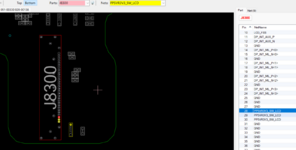
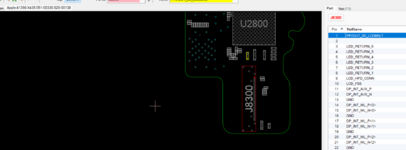
2. Check the connection status of the flex video cable (J8300), that it has a good connection and the contacts are clean. If everything looks good, step 3.
3. Verify that the PPVOUT_S0_LCDBKLT signal is on pin 1 of J8300 and the PP5VR3V3_SW_LCD signal is on pins 28, 29 and 30.
These voltages will be available only if the screen is connected.
Good luck!
 

Attachments

  • 820-00138-A Dr BIOS 01.png
    820-00138-A Dr BIOS 01.png
    194 KB · Views: 2
  • 820-00138-A Dr BIOS 02.png
    820-00138-A Dr BIOS 02.png
    195.4 KB · Views: 2

daengrani

Registered

reputation_scoree

Turn off the MacbookPro, hold down cmd+opt(alt)+R+P keys, without releasing press Power ON to turn on. Release the keys when you hear the typical power-up sound a second time. If it doesn't work, turn it off again and disconnect the battery and without connecting the adapter press and hold for 30 seconds the Control+CMD keys on the left side + shift+Power ON on the right side. Plug the battery back in and see if it resolves.
If not, try this:
1. Shine a flashlight at the height of the apple to see if there is a background image. If there is no image, step 2.
2. Check the connection status of the flex video cable (J8300), that it has a good connection and the contacts are clean. If everything looks good, step 3.
3. Verify that the PPVOUT_S0_LCDBKLT signal is on pin 1 of J8300 and the PP5VR3V3_SW_LCD signal is on pins 28, 29 and 30.
These voltages will be available only if the screen is connected.
Good luck!
thank you sir (y), I cross check actualy backlight is problem
 
Who is viewing this thread?

There are currently 0 members watching this topic

Top