Technical Support a 1502 led functioning

Tara Laptops

Tara laptops
Registered

reputation_scoree

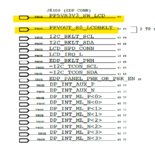
I have one 820-4924 for repairs . all voltages on connector j8300 are missing . There is dim display on panel. i have changed the brightness ic. Is there any demo of step by step functioning of the led.
 

Notebook Centro CHILE

Leonardo Carrasco
Registered

reputation_scoree

I have one 820-4924 for repairs . all voltages on connector j8300 are missing . There is dim display on panel. i have changed the brightness ic. Is there any demo of step by step functioning of the led.
WHAT TO DO WHEN THERE IS NO BACKLIGHT ON A MACBOOK?
For this case, the diagnosis of a MB 820-00165-A board is used as an example, which does not provide backlight, but the image can be viewed against the light.
Before testing with the motherboard energized, the resistance of the most critical components listed on the schematic should be measured. And it is assumed that all components and / or external parts that are related to the malfunction have already been discarded.
Verify that the operation of the PPHV_S0SW_LCDBKLT line is correct, to do this, do the following:
1. Measuring the resistance of inductor L7701: 0.414 can be considered a normal value.
2. Measure the resistance of DIODE D7701, it should show a reading of 388 at the anode (A) and 531 at the cathode (K) and its measurement value or reading on the multimeter when tested as such must be 0.166 to be considered a normal value.
Power the motherboard with electrical power and connect the screen to continue the tests:
3. Check the voltage (25V) of inductor L7701, line PPVIN_S0SW_LCDBKLT pin1 and line pin2 LCDBKLT_BOOST. A reading of less than 25V can be considered abnormal.
4. Verify the voltage of DIODE D7701, which should read 8.5V at the anode (A) and 25V at the cathode (K).
If these readings indicated in points 1 to 4 are not met, replace DIODE D7701 before continuing and verify if the problem is solved. If still not resolved, and before replacing IC U7701 the operation of the following should be verified:
5. Measure capacitor resistance C7701: 0.428 can be considered a normal value.
6. Check the voltage of the PP5V_S0 line, pin1 of the capacitor C7701 (VIN), in which a reading of 5V should be registered.
7. Check the voltage of the PP3V3_S0 line, pin1 of the capacitor C7711 (VDDIO), in which a reading of 3.3V should be registered.
8. Check the voltage of the enabling resistor R7731 (BKL_EN), which should indicate a consumption of 8.5V on pin 1 of the PPVIN_S0SW_LCDBKLT line, and 2.8V on pin 2 of the BKL_EN line to consider it a normal reading.
9. Check that the voltage of resistor R7704 is 3.3V on each pin 1 and 2 (BKL_PWM).
10. Check that the voltage of resistor R7753 (BKL_SCL) is 3.3V on each pin 1 and 2.
11. Check that the voltage of resistor R7757 (BKL_SDA) is 3.3V on each pin 1 and 2

The example also serves for the model of your query.
Credits for Notebook Centro CHILE 🤔
good luck!
 

Tara Laptops

Tara laptops
Registered

reputation_scoree

is there any theoratical explanation regarding the step by step process of LED. Means how led function. Total communication of led with motherboard. First signal to led to the last signal. Proper theory of the subject is confidence. Pls show me a site where i can get detail knowledge. Thanks
 

Tara Laptops

Tara laptops
Registered

reputation_scoree

EDP_BKLT_PWM and EDP_BKLT_EN both these signals are missing. Now which signal should i check ?
 

Tara Laptops

Tara laptops
Registered

reputation_scoree

from cpu. I dont know what is the input signal to cpu which enables EDP_BKLT_EN.
 

Notebook Centro CHILE

Leonardo Carrasco
Registered

reputation_scoree

from cpu. I dont know what is the input signal to cpu which enables EDP_BKLT_EN.
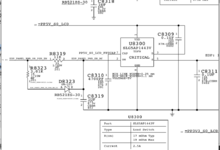
It is enabled on U8330, it is very possible that it is the reason for the failure. It is a smd dual input NOR gate.
Verify that the voltage PP3V3_S0 (3V) is in R8331, verify that R8330 is in good condition, this is the one that powers the panel.
Good luck!
 
Last edited:

Notebook Centro CHILE

Leonardo Carrasco
Registered

reputation_scoree

is there any theoratical explanation regarding the step by step process of LED. Means how led function. Total communication of led with motherboard. First signal to led to the last signal. Proper theory of the subject is confidence. Pls show me a site where i can get detail knowledge. Thanks
In the case of Apple computers, the backlight circuit is on the motherboard rather than on the screen (as opposed to how IBM PC-based brands do). This is the main reason why laptop screens cannot be used on a MacBook. This design also makes the MacBook particularly vulnerable to water damage. Water can instantly kill the backlight circuit, which for proper operation must fluctuate between 28V and 50V to be considered normal. To measure this, the display needs to be connected to the logic board when performing power tests.

Good luck with the repair!
 

Tara Laptops

Tara laptops
Registered

reputation_scoree

In the case of Apple computers, the backlight circuit is on the motherboard rather than on the screen (as opposed to how IBM PC-based brands do). This is the main reason why laptop screens cannot be used on a MacBook. This design also makes the MacBook particularly vulnerable to water damage. Water can instantly kill the backlight circuit, which for proper operation must fluctuate between 28V and 50V to be considered normal. To measure this, the display needs to be connected to the logic board when performing power tests.
Thanks for the valuable information
 

Tara Laptops

Tara laptops
Registered

reputation_scoree

it comes from cpu. I dont know which signal is the input to the cpu to trigger ON the backlit section
 

Patrick Ribbsaeter

Lagadatorumea
Staff member
Registered

Reputation:

  1. How much amperage do u get on the power supply?
  2. Post all the voltages u have taken so far, from DC_IN, VCCRTC, SMC_BC_ACOK, VCCSUS3_3, HALL SENSOR, PM_BATLOW and so on..?
  3. Did u check the pins on the bios and clock frequencies, data in/output? pin 2, pin 5, pin 6, all 7 pins?
The more detailed updates you post, the sooner you can have this fixed. we need to know what state your laptop is stuck in.
Also try to mention whats the history of the computer. What happened to it?
 

Notebook Centro CHILE

Leonardo Carrasco
Registered

reputation_scoree

on pin no 2 enable signal is 0v.
If it refers to pin 2 of U8300, check C8319, D8323 R8319, if ok, replace U8300 (LED backlight power supply).
If R8319 is out of range, before replacing the U8300 backlight source, check R8310, R8321, R8322, R8323, R8330.
R8319 (EDP_PANEL_PWR_OR_PSR_EN) use current flow to test before creating enable rail in EDP_BKLT_EN, you can also check EDP_BKLT_PSR_EN rail, in R8331 which is where current tests are done to enable EDP_PANEL_Rail so please check (if applicable) R8330 from U8330, if everything is OK, replace U8330 as well.

Good luck!
 

Notebook Centro CHILE

Leonardo Carrasco
Registered

reputation_scoree

  1. How much amperage do u get on the power supply?
  2. Post all the voltages u have taken so far, from DC_IN, VCCRTC, SMC_BC_ACOK, VCCSUS3_3, HALL SENSOR, PM_BATLOW and so on..?
  3. Did u check the pins on the bios and clock frequencies, data in/output? pin 2, pin 5, pin 6, all 7 pins?
The more detailed updates you post, the sooner you can have this fixed. we need to know what state your laptop is stuck in.
Also try to mention whats the history of the computer. What happened to it?
I understood at the beginning of the thread that everything worked except the display backlight so you only need to focus on the U8300 and U8330.
Obviously, you are supposed to have ruled out LCD panel, video cable and J8300 connector failure.
If you have dark screen with background image, then I2C and SMC are OK, it would be only source problem since it is understood to be in acpi s0 state, right?
 

Attachments

  • fix bkl drbios hlp.png
    fix bkl drbios hlp.png
    56.6 KB · Views: 5

Notebook Centro CHILE

Leonardo Carrasco
Registered

reputation_scoree

It does not come from the CPU, it is enabled in U8300, backlight power supply and U8330 is used so that the rail EDP_PANEL_PWR_PSR_EN USE TO DOWNLOAD THE LCD BEFORE THE POWER IS TURNED OFF comes from cpu. I dont know which signal is the input to the cpu to trigger ON the backlit section
 
Who is viewing this thread?

There are currently 0 members watching this topic

Top