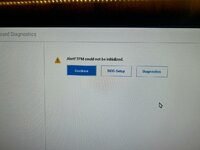
To fix the "Alert! TPM could not be initialized" error, start by power cycling the computer (unplug for 30+ seconds), updating the BIOS/firmware from windows, and enabling TPM (or Intel PTT/AMD fTPM) in the BIOS security settings. If the error persists, clear the TPM in Windows via tpm.msc or reinstall the TPM driver in Device Manager.
This site uses cookies to help personalise content, tailor your experience and to keep you logged in if you register.
By continuing to use this site, you are consenting to our use of cookies.