Hello there,
i have a problem with a Lenovo laptop.
I tried different bios 16mb and 128kb but problem is still there.
I tried with other 128kb files but then the keyboard is not working completely. Then i flashed the original file & at boot and in bios settings the keyboard is working and also backlight is working.
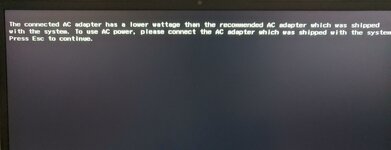
As soon as im booting to SSD (Windows) the message "The connected AC adapter has a lower wattage than the recommended AC adapter" "press ESC to continue"
Battery is not charging. Also the keyboard is not working after pressing "ESC".
I checked everything 100 times on the mainboard, everything is ok. Before i flashed 128kb (verison BHCN27WW) file first time it was charging the laptop at least normal.
What is the fix?
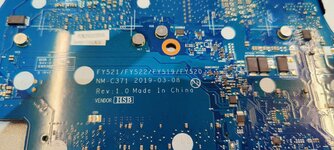
Please check photos.
i have a problem with a Lenovo laptop.
I tried different bios 16mb and 128kb but problem is still there.
I tried with other 128kb files but then the keyboard is not working completely. Then i flashed the original file & at boot and in bios settings the keyboard is working and also backlight is working.
As soon as im booting to SSD (Windows) the message "The connected AC adapter has a lower wattage than the recommended AC adapter" "press ESC to continue"
Battery is not charging. Also the keyboard is not working after pressing "ESC".
I checked everything 100 times on the mainboard, everything is ok. Before i flashed 128kb (verison BHCN27WW) file first time it was charging the laptop at least normal.
What is the fix?
Please check photos.