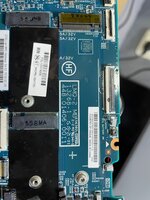
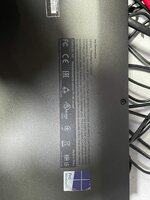
Unlock Bios Password X1 Carbon Gen 3

SAAFKOMDOOEL

Saaf
Registered
Premium Silver

reputation_scoree

Attachments

  • WhatsApp Image 2026-01-14 at 17.48.22.jpeg
    WhatsApp Image 2026-01-14 at 17.48.22.jpeg
    610 KB · Views: 1
  • WhatsApp Image 2026-01-14 at 17.48.24 (1).jpeg
    WhatsApp Image 2026-01-14 at 17.48.24 (1).jpeg
    447.9 KB · Views: 2
  • WhatsApp Image 2026-01-14 at 17.48.24.jpeg
    WhatsApp Image 2026-01-14 at 17.48.24.jpeg
    540.6 KB · Views: 1

Vahab Hemmati

Support Team
Staff member
Admin
Registered

Reputation:

"Instructions for use"

Remove all battery and CMOS battery

press F1 to enter setup: password 1234
wait 20sec or more.
Enter any ID to hardware Id.
Press 2x space bar when asked.
Turn off the computer.
and restore your original bios .

Enjoy.

If 2x 5beep, it's normal.
I didn't do checksum but it must light up anyway.
Wait minimum 30sec before screen logo light on. Must turn on/off several times by itself.
 

Attachments

  • unlock.zip
    6.2 MB · Views: 1

SAAFKOMDOOEL

Saaf
Registered
Premium Silver

reputation_scoree

"Instructions for use"

Remove all battery and CMOS battery

press F1 to enter setup: password 1234
wait 20sec or more.
Enter any ID to hardware Id.
Press 2x space bar when asked.
Turn off the computer.
and restore your original bios .

Enjoy.

If 2x 5beep, it's normal.
I didn't do checksum but it must light up anyway.
Wait minimum 30sec before screen logo light on. Must turn on/off several times by itself.
by restore original bios do you mean put the bios i sent?
 
Who is viewing this thread?

There are currently 0 members watching this topic
Top