chromia-6050a2930001-mb-a01[a1] sir plese send me the file
A Asghar ali Asghar ali Registered Bronze reputation_scoree Jun 28, 2022 #1 chromia-6050a2930001-mb-a01[a1] sir plese send me the file
A Asghar ali Asghar ali Registered Bronze reputation_scoree Jun 28, 2022 #2 Asghar ali said: chromia-6050a2930001-mb-a01[a1] sir plese send me the file Click to expand... this file i have bott disply too mch let Attachments silvr hp probook g4 okayyyyy.BIN 32 MB · Views: 20
Asghar ali said: chromia-6050a2930001-mb-a01[a1] sir plese send me the file Click to expand... this file i have bott disply too mch let
Vahab Hemmati Support Team Staff member Admin Registered Reputation: Jun 28, 2022 #3 Asghar ali said: this file i have bott disply too mch let Click to expand... Attachments 6050a2930001 clear.zip 9.2 MB · Views: 35
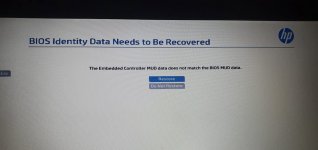
A Asghar ali Asghar ali Registered Bronze reputation_scoree Jun 28, 2022 #4 this file good butt arar kming plese remove arar Attachments e7d7fbca-694c-4f4a-bdc7-6863f6c6070e.jpg 82.4 KB · Views: 4
Vahab Hemmati Support Team Staff member Admin Registered Reputation: Jun 28, 2022 #5 Use this procedure to reset the CMOS and recover the BIOS. Turn off the computer. Press and hold the Windows + V keys, and then simultaneously press and hold the power button. ... When the CMOS Reset screen displays or you hear beeping sounds, release the Windows + V keys. ... Press enter to restart the computer.
Use this procedure to reset the CMOS and recover the BIOS. Turn off the computer. Press and hold the Windows + V keys, and then simultaneously press and hold the power button. ... When the CMOS Reset screen displays or you hear beeping sounds, release the Windows + V keys. ... Press enter to restart the computer.
A Asghar ali Asghar ali Registered Bronze reputation_scoree Jun 28, 2022 #6 Vahab Hemmati said: Use this procedure to reset the CMOS and recover the BIOS. Turn off the computer. Press and hold the Windows + V keys, and then simultaneously press and hold the power button. ... When the CMOS Reset screen displays or you hear beeping sounds, release the Windows + V keys. ... Press enter to restart the computer. Click to expand... Vahab Hemmati said: Use this procedure to reset the CMOS and recover the BIOS. Turn off the computer. Press and hold the Windows + V keys, and then simultaneously press and hold the power button. ... When the CMOS Reset screen displays or you hear beeping sounds, release the Windows + V keys. ... Press enter to restart the computer. Click to expand... not solfe arar prablme
Vahab Hemmati said: Use this procedure to reset the CMOS and recover the BIOS. Turn off the computer. Press and hold the Windows + V keys, and then simultaneously press and hold the power button. ... When the CMOS Reset screen displays or you hear beeping sounds, release the Windows + V keys. ... Press enter to restart the computer. Click to expand... Vahab Hemmati said: Use this procedure to reset the CMOS and recover the BIOS. Turn off the computer. Press and hold the Windows + V keys, and then simultaneously press and hold the power button. ... When the CMOS Reset screen displays or you hear beeping sounds, release the Windows + V keys. ... Press enter to restart the computer. Click to expand... not solfe arar prablme
Vahab Hemmati Support Team Staff member Admin Registered Reputation: Jun 28, 2022 #7 Asghar ali said: not solfe arar prablme Click to expand... Attachments 6050a2930001-mb-a01.zip 14.3 MB · Views: 24