Technical Support A1398 - 820-3332-A Board

irepairs

Registered

reputation_scoree

Hello I have MacBook Pro A1398 820-3332-A Board. When I plug the adapter it the light on the adapter turns green for 3 seconds and then orange. The laptop doesn't power on. I checked PP3V42_G3H it's present however PPBUS_G3H is not present , I am getting 180mV on Fuse F7040, Q7030 Drain Pin. I checked U7000 pins VDD and VDDP, it's getting 5.4V on both however the Phase Pin is 180mV. I checked the SMC , the SMC_RESET_L is getting 3.3V. The SMC Reset, Supervisor and AVREF U5010 chip is generating 3.3V for signal PP3V3_S5_AVREF_SMC. Can you please help me guide me where the issue could be?
 

irepairs

Registered

reputation_scoree

Hello, I have replaced the charging IC (U7000) and I am getting now 16V on the Q7030 drain pin however the Fuse F7040 is still at 200mV. For the charging IC, I have the following signals AMON: 2V, LGATE: 0V, UGATE: 200mV, PHASE: 200mV. I still don't have PPBUS_G3H reference voltage. Any ideas what the issue could be?
 

Notebook Centro CHILE

Leonardo Carrasco
Registered

reputation_scoree

Hello I have MacBook Pro A1398 820-3332-A Board. When I plug the adapter it the light on the adapter turns green for 3 seconds and then orange. The laptop doesn't power on. I checked PP3V42_G3H it's present however PPBUS_G3H is not present , I am getting 180mV on Fuse F7040, Q7030 Drain Pin. I checked U7000 pins VDD and VDDP, it's getting 5.4V on both however the Phase Pin is 180mV. I checked the SMC , the SMC_RESET_L is getting 3.3V. The SMC Reset, Supervisor and AVREF U5010 chip is generating 3.3V for signal PP3V3_S5_AVREF_SMC. Can you please help me guide me where the issue could be?
U7000 or U7100?
 

Notebook Centro CHILE

Leonardo Carrasco
Registered

reputation_scoree

Hello, I have replaced the charging IC (U7000) and I am getting now 16V on the Q7030 drain pin however the Fuse F7040 is still at 200mV. For the charging IC, I have the following signals AMON: 2V, LGATE: 0V, UGATE: 200mV, PHASE: 200mV. I still don't have PPBUS_G3H reference voltage. Any ideas what the issue could be

Hello, I have replaced the charging IC (U7000) and I am getting now 16V on the Q7030 drain pin however the Fuse F7040 is still at 200mV. For the charging IC, I have the following signals AMON: 2V, LGATE: 0V, UGATE: 200mV, PHASE: 200mV. I still don't have PPBUS_G3H reference voltage. Any ideas what the issue could be?
MB 820-332-A/B
Use a digital multimeter to measure the resistance value to ground of each inductor on the motherboard.
Check that pin 43, 44 of J2500 is not grounded.

An advice:
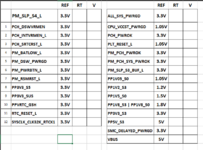
On a Macbook board up to the fifth generation of Intel, before lifting components, the first thing you should do is take a reading of the voltages and the resistance to ground of the rails that appear in the attached photo (the resistance to ground is measured placing the multimeter on the Diode scale, the red probe on Ground and touching with the black (common) probe each pin or contact of the components you want to measure, for example: 0L means out of range or no connection; 0.0000 connected to ground (short circuit); 0.450 there is a resistance, the component may be OK (no short circuit)).

From the attached image, in the RT column, write down the value of the Earth Resistance, and in V, the value of the voltage that you detect (you can make an excel sheet to save it for future reference), the values recorded in that sheet of calculation (image) are for reference.

IMPORTANT:
On a Macbook motherboard the most important line is PM_SLP_S4_L, this may have a resistor value of (eg 470) which is normal, however on power up it may read 0V, if this is the case, the fault is before creating that signal. On the contrary, if the PM_SLP_S4_L line indicates 0 Ohm when measuring the resistance to ground, there may be a problem in the PCH or CPU, in this case it is not worth pursuing or insisting on repair.

The attached test is known as "Test 11+1"

CopyRight

Ownership and credits of Notebook Centro BestChoice CHILE
The use of this information is only authorized on the Dr. BIOS site and its partners outside the Internet.

 

Attachments

  • 11+1.png
    11+1.png
    31.3 KB · Views: 10

irepairs

Registered

reputation_scoree

MB 820-332-A/B
Use a digital multimeter to measure the resistance value to ground of each inductor on the motherboard.
Check that pin 43, 44 of J2500 is not grounded.

An advice:
On a Macbook board up to the fifth generation of Intel, before lifting components, the first thing you should do is take a reading of the voltages and the resistance to ground of the rails that appear in the attached photo (the resistance to ground is measured placing the multimeter on the Diode scale, the red probe on Ground and touching with the black (common) probe each pin or contact of the components you want to measure, for example: 0L means out of range or no connection; 0.0000 connected to ground (short circuit); 0.450 there is a resistance, the component may be OK (no short circuit)).

From the attached image, in the RT column, write down the value of the Earth Resistance, and in V, the value of the voltage that you detect (you can make an excel sheet to save it for future reference), the values recorded in that sheet of calculation (image) are for reference.

IMPORTANT:
On a Macbook motherboard the most important line is PM_SLP_S4_L, this may have a resistor value of (eg 470) which is normal, however on power up it may read 0V, if this is the case, the fault is before creating that signal. On the contrary, if the PM_SLP_S4_L line indicates 0 Ohm when measuring the resistance to ground, there may be a problem in the PCH or CPU, in this case it is not worth pursuing or insisting on repair.

The attached test is known as "Test 11+1"

CopyRight

Ownership and credits of Notebook Centro BestChoice CHILE
The use of this information is only authorized on the Dr. BIOS site and its partners outside the Internet.

Thank You Leonardo. Appreciate it. That is very useful. I will carry on these tests and post them here.
 

irepairs

Registered

reputation_scoree

Hello,

When I tried to run the tests above, I am not getting green and orange light and when I check the power supply the voltage is going down to 3.7V and the amps to 2.4A , there is a short on the DCIN now. What could be the issue?
 
Who is viewing this thread?

There are currently 0 members watching this topic

Top