Technical Support ASRock X470 Master SLI DOes not start - Boardview available.

AMDBoards

Registered

reputation_scoree

Hi,

I have a ASRock X470 Master SLI.
I get 3V on the power button.
I have 5V on the memory.
The 12V is missing.
There is not short between 12V and GND.
When I push the power button nothing happens - not even a little spin from the FAN.
The PSU does not activate I think on the 12V at all.
The Boardview is attached.
How should I start to check this?
Should I short the 24pin ATX connector to activate the PSU to see if the board will work?
 

Attachments

  • ASRock X470 MASTER SLI_AC r1.02 80-MXB7G0-A01 (1).fz
    515.7 KB · Views: 4

Ahmad Safari

Registered
Golden

Reputation:

Try another psu first.
By connecting the green wire to black, the psu turns on and you can get voltage.

If there is no problem with the psu, test the 12-volt , especially the cpu power supply MOSFETs.
 

AMDBoards

Registered

reputation_scoree

Try another psu first.
By connecting the green wire to black, the psu turns on and you can get voltage.

If there is no problem with the psu, test the 12-volt , especially the cpu power supply MOSFETs.
PSU is fine. tested it with PSU tester.
If I short the PSU all power is lost on the board.

I identified from the power button the 3V and followed it back to two PU ICs that I am checking now for operation.
From what I know so far, the 3V and 5V are present on the board in the OFF state it has. Pressing the power button has to produce EN signal that will enable the 12V delivery on the board. The first two PUs are the 3VSB and 3VSB_A and the correct voltages are on their in and out pins and control is also present. So the SIO seems to be having power and working, moving on to the next PU.

If anyone can check the Boardview I attached, it would be great.
 

Ahmad Safari

Registered
Golden

Reputation:

I saw the birdview.
You have 3 and 5 volt standby. But you do not have 3, 5 and 12 volts, which are produced together after turning on these three voltages. Pins 2, 6 and 10. You connect pin 16 to pin 15 instantly with Pence. Check the voltage and see that 3, 5 and 12 volts are normal. If it is normal, program the BIOS first.
 

AMDBoards

Registered

reputation_scoree

I saw the birdview.
You have 3 and 5 volt standby. But you do not have 3, 5 and 12 volts, which are produced together after turning on these three voltages. Pins 2, 6 and 10. You connect pin 16 to pin 15 instantly with Pence. Check the voltage and see that 3, 5 and 12 volts are normal. If it is normal, program the BIOS first.
Shorting pin 16 to 15 - CPU fan spins for 1 second and stops. There is 5v on memory and 3v accessories, there is no 12v on cpu.
If I remove the 8pin cpu power cable same.
Another thing is that - when in standby 3v and 5v are present and PCH leds are flashing. Once I short pin 15 and 16 - the leds stop to work.
 

Ahmad Safari

Registered
Golden

Reputation:

If there are graphics or other pieces on the board, bring them. There may be a problem with those parts. Just put the RAM and CPU on the board and test.
 

AMDBoards

Registered

reputation_scoree

Here is the video. My mistake - I didn't know that the short between pin 15 and 16 had to be constant.
 

Attachments

  • b12.mp4
    19.6 MB

Ahmad Safari

Registered
Golden

Reputation:

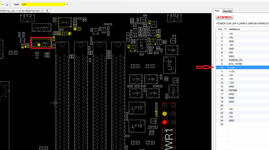
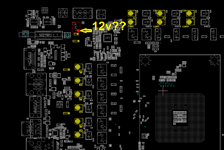
Program the BIOS. Replace the CPU and spray clean its socket. Do you have 12V voltage without CPU check? Voltage 12 should be present with 3 and 5 volts and its absence is abnormal. In fact, the fan is rotating and there should be 12 volts as shown below.

There may be a problem with the PCH, but before that, we must be sure of the health of the 12-volt circuit.


In the second picture, you do not have 12 volts in the specified section?
 

Attachments

  • Untitled.png
    Untitled.png
    189.8 KB · Views: 3
  • Untitled2.png
    Untitled2.png
    182.3 KB · Views: 3
Who is viewing this thread?

There are currently 0 members watching this topic

Top