
Technical Support Asus laptop unresponsive

Nasir Haleem

Registered

reputation_scoree

Hello, The laptop fan runs at high speed when turned on. Other than that, there is no functionality. I checked with a thermal camera and the CPU is cold. Nothing is functioning. The Caps Lock led is solid, and the light indicator led next to the charging led is also solid. I would appreciate some direction. The fan runs on high even when the screen top is shut. I downloaded the provided schematic but not information was available on the download. Also adobe had a notice that some of the download was locked with a signature. Thank you
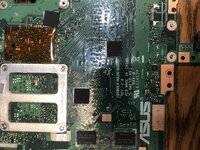
 

Attachments

  • asus logic board.jpg
    asus logic board.jpg
    3.4 MB · Views: 5

Hosein Asadolahi

Staff member
Registered

Reputation:

Hello, The laptop fan runs at high speed when turned on. Other than that, there is no functionality. I checked with a thermal camera and the CPU is cold. Nothing is functioning. The Caps Lock led is solid, and the light indicator led next to the charging led is also solid. I would appreciate some direction. The fan runs on high even when the screen top is shut. I downloaded the provided schematic but not information was available on the download. Also adobe had a notice that some of the download was locked with a signature. Thank you
do you volt check at all ?
do you ohm check with repair guide ?
do you check anything at all ??
we can't help you if you dont do any thing .
 

Nasir Haleem

Registered

reputation_scoree

Simple instructions would suffice. You can't get angry when someone asks for help. Not all of us are on the same level of understanding. I am trying to learn, and yelling is not the solution. If you offered some direction where to make a voltage check first, and which ohm repair guide, we can make progress. I'm sure you are a great technician, but you are not being a very good help to this issue. I am sorry to speak this way but after a week, you should be offering more than just insults. Thank you. Also, I finally found the problem and solved it. I could have solved it much sooner with your help.
 

Hosein Asadolahi

Staff member
Registered

Reputation:

Simple instructions would suffice. You can't get angry when someone asks for help. Not all of us are on the same level of understanding. I am trying to learn, and yelling is not the solution. If you offered some direction where to make a voltage check first, and which ohm repair guide, we can make progress. I'm sure you are a great technician, but you are not being a very good help to this issue. I am sorry to speak this way but after a week, you should be offering more than just insults. Thank you. Also, I finally found the problem and solved it. I could have solved it much sooner with your help.
i am not angry bro . i'm here to help you not for learning you . ok ? this section is technical suport not technical teaching . so you must learn at first and after that you come here and get advice . ok ? so if you want to learn you must watch the videos in this link : Video Tutorial and Articles .
one week ???? you created post at feb 26 (Friday at 8:33 PM) and i answer it in feb 27 (Yesterday at 6:03 PM). are you sure that is one week ???
 

Nasir Haleem

Registered

reputation_scoree

i am not angry bro . i'm here to help you not for learning you . ok ? this section is technical suport not technical teaching . so you must learn at first and after that you come here and get advice . ok ? so if you want to learn you must watch the videos in this link : Video Tutorial and Articles .
one week ???? you created post at feb 26 (Friday at 8:33 PM) and i answer it in feb 27 (Yesterday at 6:03 PM). are you sure that is one week ???
Fair enough. Thank you
 
Who is viewing this thread?

There are currently 0 members watching this topic

Users who has read this topic
Top