i mistakenly deleted the 16mb file COMPUTRO-60502945601-MB-A01(A1) PLEASE HELP
O OBIIICOM Registered reputation_scoree Jan 14, 2025 #1 i mistakenly deleted the 16mb file COMPUTRO-60502945601-MB-A01(A1) PLEASE HELP
Vahab Hemmati Support Team Staff member Admin Registered Reputation: Jan 14, 2025 #2 https://dr-bios.com/attachments/32mb-zip.86310/ https://dr-bios.com/attachments/16mb-zip.86309/
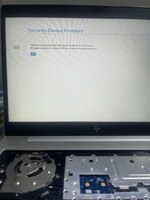
O OBIIICOM Registered reputation_scoree Jan 14, 2025 #3 Vahab Hemmati said: https://dr-bios.com/attachments/32mb-zip.86310/ https://dr-bios.com/attachments/16mb-zip.86309/ Click to expand... THIS IS THE 32MB Vahab Hemmati said: https://dr-bios.com/attachments/32mb-zip.86310/ https://dr-bios.com/attachments/16mb-zip.86309/ Click to expand... ITS SAYING "THERE IS A PROBLEM WITHTHE SECURITY"
Vahab Hemmati said: https://dr-bios.com/attachments/32mb-zip.86310/ https://dr-bios.com/attachments/16mb-zip.86309/ Click to expand... THIS IS THE 32MB Vahab Hemmati said: https://dr-bios.com/attachments/32mb-zip.86310/ https://dr-bios.com/attachments/16mb-zip.86309/ Click to expand... ITS SAYING "THERE IS A PROBLEM WITHTHE SECURITY"
Vahab Hemmati Support Team Staff member Admin Registered Reputation: Jan 14, 2025 #4 i sent both 32mb and 16mb files give em try
O OBIIICOM Registered reputation_scoree Jan 15, 2025 #5 Vahab Hemmati said: i sent both 32mb and 16mb files give em try Click to expand... i did but it was saying "THERE IS A PROBLEM WITHTHE SECURITY" please help rectify. thanks
Vahab Hemmati said: i sent both 32mb and 16mb files give em try Click to expand... i did but it was saying "THERE IS A PROBLEM WITHTHE SECURITY" please help rectify. thanks
Salimeh Bolboli Staff member Admin Registered Reputation: Jan 15, 2025 #6 OBIIICOM said: i did but it was saying "THERE IS A PROBLEM WITHTHE SECURITY" please help rectify. thanks Click to expand... Send a photo of that error.
OBIIICOM said: i did but it was saying "THERE IS A PROBLEM WITHTHE SECURITY" please help rectify. thanks Click to expand... Send a photo of that error.
O OBIIICOM Registered reputation_scoree Jan 16, 2025 #7 Salimeh Bolboli said: Send a photo of that error. Click to expand... Attachments WhatsApp Image 2025-01-16 at 2.44.51 AM.jpeg 78.1 KB · Views: 6
Vahab Hemmati Support Team Staff member Admin Registered Reputation: Jan 16, 2025 #8 this problem is not related to bios can't be resolved with bios programming
O OBIIICOM Registered reputation_scoree Jan 16, 2025 #9 Vahab Hemmati said: this problem is not related to bios can't be resolved with bios programming Click to expand... so how do we solve this problem
Vahab Hemmati said: this problem is not related to bios can't be resolved with bios programming Click to expand... so how do we solve this problem
Vahab Hemmati Support Team Staff member Admin Registered Reputation: Jan 16, 2025 #10 Bios - Samsung 840 G5 6050A2945601 Bios | BIOS Fix for Black Screen / No Display Download BIOS repair file for Samsung 840 G5 6050A2945601 Bios. Useful for black screen, no display and motherboard-level troubleshooting. dr-bios.com
Bios - Samsung 840 G5 6050A2945601 Bios | BIOS Fix for Black Screen / No Display Download BIOS repair file for Samsung 840 G5 6050A2945601 Bios. Useful for black screen, no display and motherboard-level troubleshooting. dr-bios.com
O OBIIICOM Registered reputation_scoree Jan 21, 2025 #11 Vahab Hemmati said: Bios - Samsung 840 G5 6050A2945601 Bios | BIOS Fix for Black Screen / No Display Download BIOS repair file for Samsung 840 G5 6050A2945601 Bios. Useful for black screen, no display and motherboard-level troubleshooting. dr-bios.com Click to expand... Its saying "THERE IS A PROBLEM WITHTHE SECURITY"
Vahab Hemmati said: Bios - Samsung 840 G5 6050A2945601 Bios | BIOS Fix for Black Screen / No Display Download BIOS repair file for Samsung 840 G5 6050A2945601 Bios. Useful for black screen, no display and motherboard-level troubleshooting. dr-bios.com Click to expand... Its saying "THERE IS A PROBLEM WITHTHE SECURITY"
Vahab Hemmati Support Team Staff member Admin Registered Reputation: Jan 21, 2025 #12 there is no other way to resolve this problem its not even bios password ! maybe its locked by some kind of HP company security system
there is no other way to resolve this problem its not even bios password ! maybe its locked by some kind of HP company security system