
You are using an out of date browser. It may not display this or other websites correctly.
You should upgrade or use an alternative browser.
You should upgrade or use an alternative browser.
File Request HP Compaq 6730b
- Thread starter xit01234
- Start date

Reputation:
Hello,
Wifi is whitelist on bios F17 and unable to upgrade. Attched bios F17.
I referenced searched on the web the motherboard model from the SKU Nmber KR971UT#ABA from bios to 486248-001 to 6050A2219901-MB-A03 please verify.
Thank you.
Attachments
Reputation:
you need program the bin file on motherboard with programmer device
then it will work
then it will work
Hello,
I was able to find the DOS Flash utility by downloading F14 bios from HP 6730b site. I replaced the bin and renamed. Copied the files to a FreeDos USB and flashed the 6730b. Powered Down and replaced the WiFi Card. Rebooted and received this message...
104-Unsupported wireless network device detected.
System Halted. Remove device and restart.
The bin file did not fix the problem. Thanks.
I was able to find the DOS Flash utility by downloading F14 bios from HP 6730b site. I replaced the bin and renamed. Copied the files to a FreeDos USB and flashed the 6730b. Powered Down and replaced the WiFi Card. Rebooted and received this message...
104-Unsupported wireless network device detected.
System Halted. Remove device and restart.
The bin file did not fix the problem. Thanks.
Reputation:
Hello,
I flashed the update.bin no the bios reads as F20. I default bios to factory and installed new WiFi card. I get the same message...
104-Unsupported wireless network device detected.
System Halted. Remove device and restart.
The update.bin did not work. Thank you.
I flashed the update.bin no the bios reads as F20. I default bios to factory and installed new WiFi card. I get the same message...
104-Unsupported wireless network device detected.
System Halted. Remove device and restart.
The update.bin did not work. Thank you.
Hello,
I flashed the update.bin now the bios reads as F20. I default bios to factory and installed new WiFi card. I get the same message...
104-Unsupported wireless network device detected.
System Halted. Remove device and restart.
The update.bin did not work. Thank you.
I flashed the update.bin now the bios reads as F20. I default bios to factory and installed new WiFi card. I get the same message...
104-Unsupported wireless network device detected.
System Halted. Remove device and restart.
The update.bin did not work. Thank you.
Reputation:
unfortunately there is no other bios file for this device
all files have been sent
all files have been sent
Reputation:
Reputation:
all files where extracted from main source
unfortunately there is no other file for this device
unfortunately there is no other file for this device
Hello,
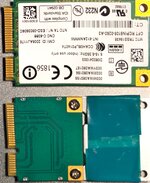
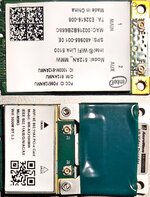
I have more information about the wifi card that may help white list the Intel WR-AX310HMW wifi card. The old Intel WiFi Link 5100 works with the original bios F20. See photos attached.
TIA!!!
I have more information about the wifi card that may help white list the Intel WR-AX310HMW wifi card. The old Intel WiFi Link 5100 works with the original bios F20. See photos attached.
TIA!!!
Attachments

Reputation:
HiHello,
I have more information about the wifi card that may help white list the Intel WR-AX310HMW wifi card. The old Intel WiFi Link 5100 works with the original bios F20. See photos attached.
TIA!!!
do you need F20 version of the bios ?
Hello,Hi
do you need F20 version of the bios ?
It's the current bios on the Hp 6730b. If you have another version, I will test.
TIA!!!
Reputation:
The wifi card photos are correct. Correction looking to white list Intel WR-AX210HMW.
Attachments
Reputation:
I flashed the bios with the bin file you provided and have a same error.
Attachments
Hello,
I flashed the bios and on reboot I have a blank screen with cap-locks and num-locks doing a 2 flash sequence meaning BIOS Corruption; then rebooted again and cap-locks just constantly flashes. I have tried some Emergency BIOS Recovery methods by have a good bios on a USB2 drive, powering up holding the Windows key + B key (also Windows key + V key) and doesn't work. I tried all suggested bios name starting with the original 68PDD.bin, HPBIOS.bin, 6730b.bin and Rom.bin but stuck with a blank screen and constant flashing cap-locks led.
I don't understand why a BIOS backup is created if you can not recover from a backup. Has someone tested a backup recovery with these laptops and have the correct method to do a backup recovery?
TIA!!
I flashed the bios and on reboot I have a blank screen with cap-locks and num-locks doing a 2 flash sequence meaning BIOS Corruption; then rebooted again and cap-locks just constantly flashes. I have tried some Emergency BIOS Recovery methods by have a good bios on a USB2 drive, powering up holding the Windows key + B key (also Windows key + V key) and doesn't work. I tried all suggested bios name starting with the original 68PDD.bin, HPBIOS.bin, 6730b.bin and Rom.bin but stuck with a blank screen and constant flashing cap-locks led.
I don't understand why a BIOS backup is created if you can not recover from a backup. Has someone tested a backup recovery with these laptops and have the correct method to do a backup recovery?
TIA!!
Reputation:
i sent you the update bios file and also searched to do whitelist in two methods and did it for you.
also i checked the models and realized that your laptop and motherboard are not compatible.
the motherboard model is for 6530B laptop but your laptop is 6730b
maybe the problem is related to this one
did the motherboard changed on this device ?
also i checked the models and realized that your laptop and motherboard are not compatible.
the motherboard model is for 6530B laptop but your laptop is 6730b
maybe the problem is related to this one
did the motherboard changed on this device ?
Who is viewing this thread?
There are currently 0 members watching this topic
Users who has read this topic
xit01234 , Vahab Hemmati , addolfhet , Redhat , Admin , user46647 , Salimeh Bolboli , vetalsht , fran estarlich , user42533 , Msyu1711 , FatemeNikmanesh , aisikterix , Gaetan info
Related Repair Files

- Replies
- 1
- Views
- 530


- Replies
- 2
- Views
- 3K

- Replies
- 4
- Views
- 3K
- Replies
- 1
- Views
- 2K