File Request HP Compaq 6730b

xit01234

Registered
Bronze

reputation_scoree

After many hours I was able to Recover from corrupt BIOS, sequence of 2 Flashes on both cap-locks and num-locks LEDs.

Here are my notes...

HP6730b Emergency BIOS Recovery

1) On the HP6730b remove Main Battery, all drives and CMOS Battery
2) Put the HP6730b Windows Drive in an External USB Drive
3) Go to to a working computer and connect the External USB Drive with HP6730b Windows Disk (I used a Laptop with Debian 13 Trixie)
4) On the working computer Format USB Flash Drive as non-bootable FAT32 and name the drive HP_TOOLS (I used a USB 2.0 256MB Flash Drive an formatted using program called Disks in Debian)
5) The External USB Drive with HP6730B Windows Boot Disk will have a partition named HP_TOOLS. Mount HP_TOOLS Copy directory Hewlett-Packard to the USB Flash Drive
6) In the USB Flash Drive go to directory /Hewlett-Packard/BIOS/Previous and copy both files 68PDD.BIN and 68PDD.SIG and then goto directory /Hewlett-Packard/BIOS/Current and paste and replace both files (To prevent loading the last installed corrupt BIOS File)
7) Unmount the USB Flash Drive and connect it to the un-powered HP6730b's USB port ( I used the top left USB port)
8) On the HP6730b hold down both "Windows Key" + "B Key" and plugin the DC Jack to power up the HP6730b, continue holding both "Windows Key" + "B Key" even on auto power-downs and power-ups with blank screens
- The 1st power up when the DC Jack is plugged in will automatically power down after a few seconds, continue holding both "Windows Key" + "B Key". Also screen is blank
- The 2nd power up you will see the cap-locks and num-locks LEDs flash a sequence of 2 flashes with a pause indicating corrupt BIOS, it will do this 3 times and power down, continue holding both "Windows Key" + "B Key". Also screen is blank
- The 3rd power up only the cap-locks LED will be flashing and will power down, now release "Windows Key" + "B Key". Also screen is blank
- The 4th power up the screen will report BIOS Recovery was performed
- Power Down and install CMOS Battery, Drives and Main Battery
9) Power up and press ESC to edit BIOS settings and save and reboot
10) Done!!!

 

xit01234

Registered
Bronze

reputation_scoree

Now that I have HP 6730b working from a BIOS Recovery I would still like to white list another Intel card with more information. I have looked for another wifi card with FCC ID numbers since the HP6730b BIOS Information lists FCC ID for the wifi.

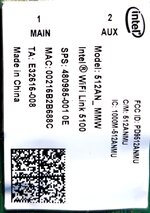
The supported wifi card is an Intel 512ANMU with FCC ID: PD9512ANMU supports upto Wireless-N (see attached photo)

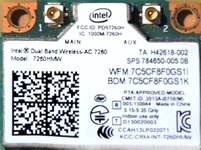
I would like to white list this Intel 7260HMW with FCC ID: PD97260H supports upto Wireless-AC (see attached photo)

I have also attached the Official HP 6730b BIOS F20 file: sp57343.exe is a zip file
sha256: 67321810a9034defc4841c5c65d47ce6a8360926ec31f566d1f9a5f4b70787da sp57343.zip

TIA!!!
 

Attachments

  • sp57343.zip
    3.2 MB · Views: 1
  • Scan_20260603_141514.jpg
    Scan_20260603_141514.jpg
    659.2 KB · Views: 2
  • Scan_20260603_142224.jpg
    Scan_20260603_142224.jpg
    1.1 MB · Views: 2

xit01234

Registered
Bronze

reputation_scoree

Hello,

Previous I requested to whitelist a WR-AX210HMW but after doing some searching on this WiFi card, I could not find any FCC ID on it.

I'm guessing the BIOS on the HP 6730b must have a list of FCC IDs that it whitelists. For example the original Intel WiFi Link 5100 has the FCC ID: PD9512ANMU this shown on the F20 BIOS Information Screen.

Therefore, I was looking at other Wifi cards that fits into the HP6730b that I have with a valid FCC ID. I do also have the Intel Wireless-AC 7260 with FCC ID PD97260H

I sent 2 photos one the current whitelisted Intel WiFi Link 5100 has the FCC ID: PD9512ANMU (limited to wireless-n) on the F20 BIOS. The other photo of the Intel Wireless-AC 7260 with FCC ID PD97260H that I would like to get whitelist in the F20 BIOS.

I posted the original HP6730b F20 BIOS so there is no confusion on which BIOS needs modded.

I hope that answers your question.

TIA!!!
 

Vahab Hemmati

Support Team
Staff member
Admin
Registered

Reputation:

Hello,

Previous I requested to whitelist a WR-AX210HMW but after doing some searching on this WiFi card, I could not find any FCC ID on it.

I'm guessing the BIOS on the HP 6730b must have a list of FCC IDs that it whitelists. For example the original Intel WiFi Link 5100 has the FCC ID: PD9512ANMU this shown on the F20 BIOS Information Screen.

Therefore, I was looking at other Wifi cards that fits into the HP6730b that I have with a valid FCC ID. I do also have the Intel Wireless-AC 7260 with FCC ID PD97260H

I sent 2 photos one the current whitelisted Intel WiFi Link 5100 has the FCC ID: PD9512ANMU (limited to wireless-n) on the F20 BIOS. The other photo of the Intel Wireless-AC 7260 with FCC ID PD97260H that I would like to get whitelist in the F20 BIOS.

I posted the original HP6730b F20 BIOS so there is no confusion on which BIOS needs modded.

I hope that answers your question.

TIA!!!
the HP6730b F20 BIOS file is a file which donwloaded from HP website.
i need the bios which you get backup from the motherboard
 

xit01234

Registered
Bronze

reputation_scoree

NOTE: Current F20 BIOS supports WiFi Card:
Intel WiFi Link 5100 has the FCC ID: PD9512ANMU

Add support for WiFi Cards:
Intel Wireless-AC 7260 with FCC ID: PD97260H
Intel Wi-Fi 6E AX210 only has one FCC ID: PD9AX210NG

I have attached the backup F20 BIOS for the HP 6730b
 

Attachments

  • MD5SUM.txt
    98 bytes · Views: 1
  • 68PDD.BIN.zip
    1.2 MB · Views: 1

xit01234

Registered
Bronze

reputation_scoree

I post a reply yesterday and today it's gone. I have had this problem quite a few times.

I tested your bios fix and I get the same message/error and need to remove new wifi card so laptop can boot.

I did look at the bios with an hex editor and was able to see the FCC ID numbers that are white listed. But just changing the readable text isn't enough. The must be other encrypted information bocking the new wifi cards and doesn't allow the laptop to boot. Looks like HP has gone a long way to block and new/faster wifi cards on this generation of laptops which is quite old.

The old WiFi card doesn't support WPA3 on modern Linux OS or Windows 10 LTSC. I removed WiFi and BT cards and using a USB TP-Link AC WiFi dongle that supports WPA3.

Thank you for all you efforts and keep up you and your teams great work!
 
Who is viewing this thread?

There are currently 0 members watching this topic

Top