
reputation_scoree
You are using an out of date browser. It may not display this or other websites correctly.
You should upgrade or use an alternative browser.
You should upgrade or use an alternative browser.
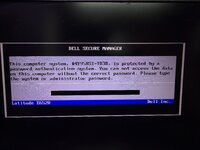
File Request LA-6561P REV:2.0
- Thread starter rafetorpak
- Start date

Reputation:

How to Remove Dell Laptop Bios Password | BIOS, Schematic & Board Repair Resource
Explore BIOS files, schematics, boardview files and technician repair resources for How to Remove Dell Laptop Bios Password.
 dr-bios.com
reputation_scoree
How to Remove Dell Laptop Bios Password | BIOS, Schematic & Board Repair Resource
Explore BIOS files, schematics, boardview files and technician repair resources for How to Remove Dell Laptop Bios Password.
Attachments
Reputation:
password : vlk8qRwfZHcC3160
* for some Dell codes press Ctrl-Enter, not Enter, when entering code into the BIOS
* for some Dell codes press Ctrl-Enter, not Enter, when entering code into the BIOS
reputation_scoree
I did as you said but he said wrong passwordpassword : vlk8qRwfZHcC3160
* for some Dell codes press Ctrl-Enter, not Enter, when entering code into the BIOS
Reputation:
password is correct !
notice uppercase and lowercase words and numbers
try with external keyboard too
notice uppercase and lowercase words and numbers
try with external keyboard too
reputation_scoree
Yes, I also tried with the external keyboard, I write the whole password correctly, but it says wrong passwordpassword is correct !
notice uppercase and lowercase words and numbers
try with external keyboard too
Reputation:
vlk8qRwfZHcC3160
lowercase v
lowercase l
lowercase k
number 8
lowercase q
uppercase R
lowercase w
lowercase f
uppercase Z
uppercase H
lowercase c
uppercase C
number 3
number 1
number 6
number 0
lowercase v
lowercase l
lowercase k
number 8
lowercase q
uppercase R
lowercase w
lowercase f
uppercase Z
uppercase H
lowercase c
uppercase C
number 3
number 1
number 6
number 0
reputation_scoree
Thank you for your help, but we are 4 people here, we all applied what they said to the letter, but it gives an error, is there another solution?vlk8qRwfZHcC3160
lowercase v
lowercase l
lowercase k
number 8
lowercase q
uppercase R
lowercase w
lowercase f
uppercase Z
uppercase H
lowercase c
uppercase C
number 3
number 1
number 6
number 0
Reputation:
reputation_scoree
Thanks it worked

Reputation:
very good
reputation_scoree
Hello, my password process has been solved with this bios file, but there is a problem right now, I can't activate it from Wifi and lan bios, USB is not active, I say activate it from bios and save it, when I enter the bios again, the setting returns to the beginning (I changed the bios battery, it is intact)very good
Reputation:
this problem is related to windows
not bios
and also you should make correct time and date
not bios
and also you should make correct time and date
reputation_scoree
No, the date and time are correct, Windows doesn't even see the flash memory to install it, even though I activate it from bios, USB, Wifi, and ethernet biostan, it does not register, it goes back to the old state, I think it can't be changed without the administrator password, I'm trying to put a password, it constantly gives an error when setting a password, if there is another working bios file from you.this problem is related to windows
not bios
and also you should make correct time and date
Reputation:
reputation_scoree
Thank you, my problem was solved when I wrote both with Ec bios

Reputation:
you are welcome
Who is viewing this thread?
There are currently 0 members watching this topic
Users who has read this topic