Unlock Bios Password Lenovo thinkpad t14 gen 3 21aj

Heyplay999

Registered
Bronze

reputation_scoree

Hello guys i have this lenovo t14 gen 3 21aj have bios password i made some research about it i get the password on ec chip i have rt809f programmer how remove the password please help
 

Redhat

Registered
Golden

reputation_scoree

Hello guys i have this lenovo t14 gen 3 21aj have bios password i made some research about it i get the password on ec chip i have rt809f programmer how remove the password please help
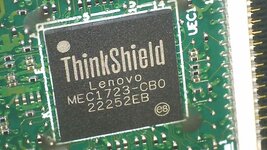
do you have MEC 1723 on motherboard ?
and send me full laptop model
 

Attachments

  • WIN_20230725_15_49_45_Pro.jpg
    WIN_20230725_15_49_45_Pro.jpg
    191.1 KB · Views: 1

Redhat

Registered
Golden

reputation_scoree

On Lenovo ThinkPad T14 / T14s Gen 3, the BIOS password is stored in EC secure storage and is bound to platform security (ThinkShield).

Even if you reflash the EC firmware or replace the EC chip, the password will NOT be removed.
Read/Write/Verify OK does not affect the protected password area.

Programming or replacing the EC on this model usually results in a non-booting (bricked) motherboard.

There is no safe DIY method for password removal on this platform.
 

Redhat

Registered
Golden

reputation_scoree

This method may work only on older EC chips such as MEC-1663.

The attached image and information were found on other forums and specifically refer to MEC-1663. It may work on boards using this older EC generation, but it is not applicable to newer EC chips.

On newer generation ECs such as MEC-1723 (ThinkShield), the security architecture is completely different and there is essentially no workable method for this kind of password removal.

Please note:
  • This method has NOT been tested by me.
  • The information may be correct or incorrect.
  • Trying it can result in board damage or a non-booting system.

If you decide to test it, you do so entirely at your own risk.
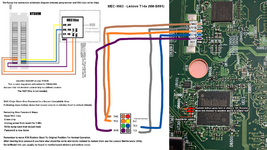
T14s - MEC-1663 - Jtag - Pinout - Bios Password Removal.png


Here is all the info you should need to remove bios password from your same model or one with an MEC-Chip and also write back the config data

T14s - MEC-1663 - Jtag - Pinout - Bios Password Removal

See Diagram for Wiring.

Use MEC-1633#ISP on your RT809h
This is same Jtag pinout and method for T490S/X390
(But your R/W 10K Resistor Location May In a Different Location)


MEC-Chips Store Bios Password In a Secure Un-Editable Area

Following steps clear that secure area to re-initialize itself to default (Blank)
Removing Bios Password Steps:
-Read MEC Chip
-Erase chip
-Unplug power from board for 2 Min
-Write dump back that we just read.-Password Is now Gone
Remember to move R/W Resistor Back To Original Position For Normal Operation.

After clearing bios password you have also wiped the serial and model number to restore them use the ThinkPad Config Information Update Utility.
Serial/Model Info can usually be found on motherboard stickers and bottom cover.
To set the Serial Number, Model Number, Etc back onto a Lenovo T14s:

I Used "ThinkPad Config Information Update Utility v1.11" attached


-Extract and run "usbfmtpw.exe" this will format your USB and copy the files over.
(check that the files copied after format. if not manually copy them to the root of the USB).
-Insert to laptop and boot to USB FDD it is EFI not Legacy (USB you just created).
-Now go 1, then use 2 to read current keys. record any keys shown, take a photo of them they will be erased if there not already.
-Now go back to main menu and choose initialize EEPROM, this clears all keys plus UUID and now the overflow error wont happen.
-Now go 1, then use 1 again to add new info, enter C0 then Enter.
-Now enter serial and model in long form will start with 1S so (1STTTTMMMMCCSSSSSSS)
-Enter and Key is stored.
-If you like can add more or go back and use option 3 for a few more config details. (I set my brand name there)
-Once all info is set go to assign UUID, and say Yes.
(once you generate the UUID you cannot edit the serials unless you initialize and do them all over again.
-Reboot and check bios screen your info should be there no more beeps on boot.


Product ID: TTTT-MMMMCC
Serial#: SS-SSSSS

TTTT = Machine Type
MMMM = Model Type
CC = Country Code
SSSSSSS = Serial Number


Heyplay999

Registered
Bronze

reputation_scoree

On Lenovo ThinkPad T14 / T14s Gen 3, the BIOS password is stored in EC secure storage and is bound to platform security (ThinkShield).

Even if you reflash the EC firmware or replace the EC chip, the password will NOT be removed.
Read/Write/Verify OK does not affect the protected password area.

Programming or replacing the EC on this model usually results in a non-booting (bricked) motherboard.

There is no safe DIY method for password removal on this platform.
What we should do? The problem is the date and time of the laptop i need to boot to usb or to the nvme to install the windows does we have any methode to bypassing date and time? Hex editor?
 

Redhat

Registered
Golden

reputation_scoree

What we should do? The problem is the date and time of the laptop i need to boot to usb or to the nvme to install the windows does we have any methode to bypassing date and time? Hex editor?
Date and time are handled by RTC and EC together and are not simple values in BIOS. If the system cannot boot, the issue is likely not date/time but firmware or security state.
 

Heyplay999

Registered
Bronze

reputation_scoree

Date and time are handled by RTC and EC together and are not simple values in BIOS. If the system cannot boot, the issue is likely not date/time but firmware or security state.
No the system is boit correctly but it have bios password i cant boot to my bootable usb because of date and time
 

Redhat

Registered
Golden

reputation_scoree

I can install windows in other laptop but the problem is the date and time
The real problem is the BIOS password, not the date and time.
Wrong date/time does not block USB boot on Lenovo systems.
If you cannot access BIOS settings, you cannot change the boot priority to USB or ODD.
 

Redhat

Registered
Golden

reputation_scoree

What we should do?
Your realistic options are:
  • Provide proof of ownership and contact Lenovo official service
  • Replace the motherboard

So-called “online unlock services” are often unreliable or scams, and there is no guaranteed safe method for this model.
 

Heyplay999

Registered
Bronze

reputation_scoree

This is my boars it is t14 gen 3 magnesium

Nm-e981 rev 1
 

Attachments

  • 20251223_172921.jpg
    10.5 MB · Views: 4
Who is viewing this thread?

There are currently 0 members watching this topic

Users who has read this topic
Top