Model Number: ThinkPad Type 20GJ - 20GJCTO1WW
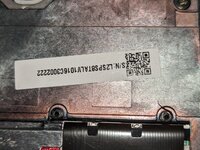
Serial Number: LR-0738BEM 16/12
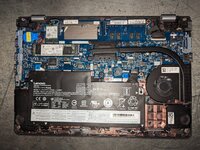
Story: Customer received a message from Lenovo Vantage Software about a BIOS/Firmware Update. They went to install the update, restarted the computer (Windows 10 they believe) and got a black screen saying "Flashing in Progress - Don't turn off computer". They got scared and thought it was a virus so they unplugged the computer and shut it down with the Power Button. Now the computer turns on, after 60 seconds all you can hear is the sound of the fan running. The red Thinkpad Light blinks two times when it first receives power and then stays solid red while the device is on. No POST Error Beeps or Blinking Lights are visible on the keyboard or where the power cord connects to the DC Jack. I have opened the laptop and removed the Lithium-Ion Battery and CMOS Battery and the symptoms are still the same when connected to AC Power. Device sat for 1 hour with fan spin with no change. I suspect the BIOS is faulty and will require reprogramming.
Support Page: laptops and netbooks :: thinkpad 13 series laptop :: thinkpad 13 :: 20gj :: 20gjcto1ww - Lenovo Support PE
Obtained BIN File from: Bios - lenovo thinkpad 13 (type 20gj 20gk) da0ps8mb8g0 bios
This YouTube Video Showed a method of doing a BIOS Recovery
(
)
and I have attempted to copy the BIN File to a USB Flash Drive with partition type of FAT32. Renamed the BIN File (obtained by Dr-BIOS.com from the previously mentioned URL) as specified in the video, including all three file names. However, the laptop doesn't seem to respond to reading the USB Flash Drive using WinKey+B, WinKey+R, FN+B or FN+R. This model may have a different keyboard shortcut that I can't seem to find information on.
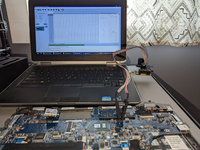
I have ordered a SOP8 SOIC8 Test Clip for EEPROM 25CXX /24CXX with CH341A 24 25 Series Programmer (SOP8 SOIC8 Test Clip for EEPROM 25CXX /24CXX with CH341A 24 25 Series Programmer 4894822313990 | eBay) in hopes that the chip can be re-programmed but want to check the group on proper process. I have no performed a BIOS Update or performed chipped program at our shop before.
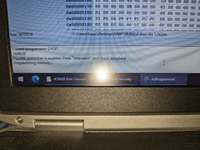
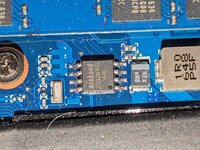
The BIOS Chip (image attached) appears to be labeled as "WinBond 25Q128FVSQ 1646"
Serial Number: LR-0738BEM 16/12
Story: Customer received a message from Lenovo Vantage Software about a BIOS/Firmware Update. They went to install the update, restarted the computer (Windows 10 they believe) and got a black screen saying "Flashing in Progress - Don't turn off computer". They got scared and thought it was a virus so they unplugged the computer and shut it down with the Power Button. Now the computer turns on, after 60 seconds all you can hear is the sound of the fan running. The red Thinkpad Light blinks two times when it first receives power and then stays solid red while the device is on. No POST Error Beeps or Blinking Lights are visible on the keyboard or where the power cord connects to the DC Jack. I have opened the laptop and removed the Lithium-Ion Battery and CMOS Battery and the symptoms are still the same when connected to AC Power. Device sat for 1 hour with fan spin with no change. I suspect the BIOS is faulty and will require reprogramming.
Support Page: laptops and netbooks :: thinkpad 13 series laptop :: thinkpad 13 :: 20gj :: 20gjcto1ww - Lenovo Support PE
Obtained BIN File from: Bios - lenovo thinkpad 13 (type 20gj 20gk) da0ps8mb8g0 bios
This YouTube Video Showed a method of doing a BIOS Recovery
(
and I have attempted to copy the BIN File to a USB Flash Drive with partition type of FAT32. Renamed the BIN File (obtained by Dr-BIOS.com from the previously mentioned URL) as specified in the video, including all three file names. However, the laptop doesn't seem to respond to reading the USB Flash Drive using WinKey+B, WinKey+R, FN+B or FN+R. This model may have a different keyboard shortcut that I can't seem to find information on.
I have ordered a SOP8 SOIC8 Test Clip for EEPROM 25CXX /24CXX with CH341A 24 25 Series Programmer (SOP8 SOIC8 Test Clip for EEPROM 25CXX /24CXX with CH341A 24 25 Series Programmer 4894822313990 | eBay) in hopes that the chip can be re-programmed but want to check the group on proper process. I have no performed a BIOS Update or performed chipped program at our shop before.
The BIOS Chip (image attached) appears to be labeled as "WinBond 25Q128FVSQ 1646"
Attachments
Last edited by a moderator: