Technical Support Suspected caps causing short to ground not on board!?

destinycenter

Registered

reputation_scoree

Hello,
Below are images of Dell Precision 7520 7720 LA-E321P laptop which has short circuit on main B+ power rail.

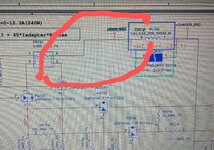
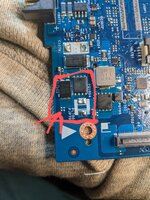
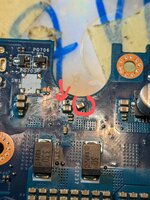
The 3 pictures below are from the charger & selector block.
I've diagnosed and found that section having the short from the inductor PL700 which is directly after the B+ current resistor PR701.

I removed that inductor which is equally a jumper & realized the short is just in between the current sense resistor& that inductor and the circuit between them is the SELECTOR block.

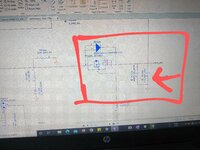
+PWR_SRC leaves resistor to enter PQ1004 in that block as pointed out with arrow in the image attached and there are 2 caps right there after the resistor.
But looking on the board itself, those caps are not there. I've pointed the caps in the picture I took of the board section.
Is it that the caps are in-board or what!? I don't get it. If so, how can I disconnect it.
 

Attachments

  • PXL_20230930_231021758~2.jpg
    PXL_20230930_231021758~2.jpg
    4.8 MB · Views: 4
  • PXL_20230930_231123389~3.jpg
    PXL_20230930_231123389~3.jpg
    2.3 MB · Views: 4
  • PXL_20230930_230230650~2.jpg
    PXL_20230930_230230650~2.jpg
    2.8 MB · Views: 4

Ahmad Safari

Registered
Golden

Reputation:

Hello
What is the Ohm value in B+ or PWR_SRC?
If you have 0 ohms, it is most likely that the capacitor is shorted and you can find the defective part by injecting voltage. Sometimes the MOSFET of the PWM circuit is shorted and we have low ohms.
To inject the first voltage, the entire ohm board must be checked.
Set the voltage to about 2 volts and the current will be open until the end.
If it doesn't get hot, increase the voltage a little, finally 4 volts.
 

destinycenter

Registered

reputation_scoree

Hello
What is the Ohm value in B+ or PWR_SRC?
If you have 0 ohms, it is most likely that the capacitor is shorted and you can find the defective part by injecting voltage. Sometimes the MOSFET of the PWM circuit is shorted and we have low ohms.
To inject the first voltage, the entire ohm board must be checked.
Set the voltage to about 2 volts and the current will be open until the end.
If it doesn't get hot, increase the voltage a little, finally 4 volts.

B+ is 0.4ohms. My multimeter doesn't show 0.0 ohms.. Yes, it does look like a capacitor. I'll inject voltage as you suggested.
I checked all the coils and only PL700 had the same ohms measurement as B+.
All the other coils look ok with their ohms. CPU had 4ohms / 5ohms.
 
Last edited:

destinycenter

Registered

reputation_scoree

I have injected voltage and found the capacitor that was bad. The short is gone after removing capacitor.
My question now is how do I know which capacitor to replace there? As there's no boardview or label on the board for the capacitor.
 

Attachments

  • PXL_20231001_110207612~2.jpg
    PXL_20231001_110207612~2.jpg
    2 MB · Views: 3

Ahmad Safari

Registered
Golden

Reputation:

Because the maximum voltage here is 20 volts, so you have to put a 25 volts capacitor.
For the same capacity (in terms of size), see the same capacitor, how many microfarads are there?
If there was no schematic, I usually size the capacitor from B + route.
The capacitor can also be removed.
 

destinycenter

Registered

reputation_scoree

Because the maximum voltage here is 20 volts, so you have to put a 25 volts capacitor.
For the same capacity (in terms of size), see the same capacitor, how many microfarads are there?
If there was no schematic, I usually size the capacitor from B + route.
The capacitor can also be removed.
Thank you. I used continuity mode to find similar capacitors on the other side of the board and saw that they were linked to a cpu microcontroller. I checked on schematic it was a 10U 25V cap. I've replaced it with the 1st input MOSFET that was short too. The laptop is fine now. Thanks
 
Who is viewing this thread?

There are currently 0 members watching this topic

Top