
Technical Support ASUS F555L Turns on but no image

Mike Gou

Mike
Registered

reputation_scoree

Hello.

I try to repair a laptop ASUS F555L which turns on but has no image on screen or via HDMI. It has motherboard X555LD REV 3.3, it also has on board ram and also a separate RAM slot (i tried other working RAM).
It draws 0.65A when turned on, fan is spinning.
I downloaded the repair guide and boardview for this model from Dr. BIOS and checked every coil and signal spot and all voltages and signals are normal as they should.
I know bios is integrated in EC but i have no programmer.
Is there any way to check if BIOS is ok, with some kind of signal? EC_RST, PLT_RST, RSM_RST signals are 3.3v which seem to be ok.

Any ideas for what else to check? Thank you in advance.
 

Hosein Asadolahi

Staff member
Registered

Reputation:

Hello.

I try to repair a laptop ASUS F555L which turns on but has no image on screen or via HDMI. It has motherboard X555LD REV 3.3, it also has on board ram and also a separate RAM slot (i tried other working RAM).
It draws 0.65A when turned on, fan is spinning.
I downloaded the repair guide and boardview for this model from Dr. BIOS and checked every coil and signal spot and all voltages and signals are normal as they should.
I know bios is integrated in EC but i have no programmer.
Is there any way to check if BIOS is ok, with some kind of signal? EC_RST, PLT_RST, RSM_RST signals are 3.3v which seem to be ok.

Any ideas for what else to check? Thank you in advance.
you can check bios signal with oscilloscope . but at first you must disable onboard ram and check with ram on slot .
 

Mike Gou

Mike
Registered

reputation_scoree

since the ram i think is on 1 coil, how can this be done?i have a DSO. in which spot should i point the probe and what signal should i expect? I guess it should be on the SIO right? thank you for your answer

EDIT: i just saw that the BIOS chip is 25b64bsig. which pin should i check?
 
Last edited:

Hosein Asadolahi

Staff member
Registered

Reputation:

since the ram i think is on 1 coil, how can this be done?i have a DSO. in which spot should i point the probe and what signal should i expect? I guess it should be on the SIO right? thank you for your answer

EDIT: i just saw that the BIOS chip is 25b64bsig. which pin should i check?
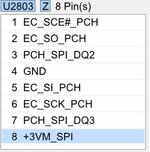
pin 5 is input data and pin 2 is output data . check this pin of bios with oscilloscope when you press power button .
for disable of onboard ram you must change pcb id of motherboard .you can do that with shift the resistor if pcb id on motherboard .
 

Mike Gou

Mike
Registered

reputation_scoree

pin 5 is input data and pin 2 is output data . check this pin of bios with oscilloscope when you press power button .
for disable of onboard ram you must change pcb id of motherboard .you can do that with shift the resistor if pcb id on motherboard .

Capture.JPG

thank you for your answer. this is the pinout of the BIOS chip from the boardview. the chip has 3.3v supply and on power on, the DSO shows a big waveform change on pins 1,2,3,5,6,7 from which all have 3.2-3.3v except 5+6 pin.
Since they have waveform is it sure that the BIOS works?

Also i noticed that DRAMRST is only 1.38v. shouldn't it be higher?
 

Hosein Asadolahi

Staff member
Registered

Reputation:

View attachment 47864

thank you for your answer. this is the pinout of the BIOS chip from the boardview. the chip has 3.3v supply and on power on, the DSO shows a big waveform change on pins 1,2,3,5,6,7 from which all have 3.2-3.3v except 5+6 pin.
Since they have waveform is it sure that the BIOS works?

Also i noticed that DRAMRST is only 1.38v. shouldn't it be higher?
Given that the BIOS of the device has an output signal, it can be concluded that it is doing its job.
so in second step you must disable onboard ram and test .
 

Mike Gou

Mike
Registered

reputation_scoree

1.38V for the DRAMRST is normal?
I have never done the change with the pcbid. There are 4 PCBID spots on the boardview and i noticed on the actual motherboard that PCBID 3+4 have a resistor to 3.3v and PCBID 1+2 to ground.
I guess if i put them the other way around it will do the job?
 

Hosein Asadolahi

Staff member
Registered

Reputation:

1.38V for the DRAMRST is normal?
I have never done the change with the pcbid. There are 4 PCBID spots on the boardview and i noticed on the actual motherboard that PCBID 3+4 have a resistor to 3.3v and PCBID 1+2 to ground.
I guess if i put them the other way around it will do the job?
ddr3 pc3l work with 1.35v so this voltage is ok .
yes you must do that .
you can check voltages in power on sequence page on repair guide : download link
 

Mike Gou

Mike
Registered

reputation_scoree

So i swapped the pcbid resistors like mentioned before and no image with separate RAM again.
I decided to buy a CH341A programmer as a last chance and flashed the BIOS again on the chip. It worked!! It is weird though because the DSO was showing fluctuations during power on at input and output of the bios chip.
The other weird thing is that the onboard ram did not get disabled after all, although i tripled checked the sequence i followed.
The important thing is that the laptop got fixed. Thank you very much for your help and time!
 
Who is viewing this thread?

There are currently 0 members watching this topic

Users who has read this topic
Top