Technical Support Lenovo G50-80 (ACLU3/ACLU4 NM-A361 REV1.0)

GrayWolf

Registered

reputation_scoree

Hello, I have this laptop which once plugged in, power led turns on for a second, fan tries to spin for a second then stops.
There is no short to ground from what I have seen or maybe I missed something. I have removed UC3, written new bios and resoldered a new chip, reflowed the GPU but nothing changed. My programmer is RT809H and I cannot read the IT8586E no matter how many times I tried, maybe I am doing it wrong since this is my first time reading a SIO chip.

Can anyone help me repair this motherboard please?
 

GrayWolf

Registered

reputation_scoree

Check conection and pin configs in programer and keyboard jack is curect?

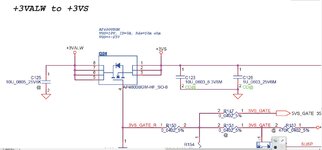
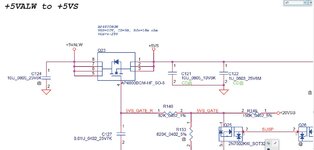
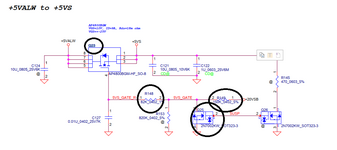
Check q23 and q24 mosfets in this model.
The connection was made using a cut flat cable and checking the pins for continuity in the MB keyboard (30pin) connector and the RT809h 32pin connector. ( The programmer says to use the 24pin connector but I haven't installed a connector in the 24pin position, that's why I am using the 32pin connector. Maybe that's my problem, I don't know. I have ordered a 24pin one though)

My Q23 pins 1,2,3,4 have 0V and pins 5,6,7,8 have 5V
My Q24 pins 1,2,3,4 have 0V and pins 5,6,7,8 have 3.3V
 

Attachments

  • Screenshot_2.jpg
    Screenshot_2.jpg
    142.4 KB · Views: 8
  • Screenshot_1.jpg
    Screenshot_1.jpg
    156.3 KB · Views: 7

GrayWolf

Registered

reputation_scoree

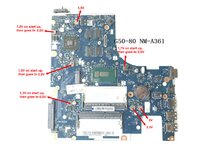
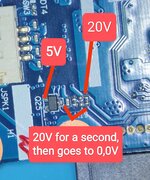
Took voltage measurements and this is the results.
Once I connect the PSU on the motherboard, the power led turns on and after a second turns off. The measurements are after the led turns off.
In that one second that the led stays on, I have voltages on the 0,0V coils.
Anyone have any idea on what is the problem?
 

Attachments

  • nm-a361 voltages.jpg
    nm-a361 voltages.jpg
    3.1 MB · Views: 11

Ahmad Safari

Registered
Golden

Reputation:

pin 4 has a problem.
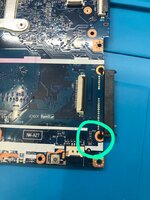
It should be 20 volts that passes through the resistor which usually breaks down. There is a transistor and a resistor behind the hdd socket. Check them.

My English is not very good and I use Google Translate. I hope our guide is effective for you.
 
Last edited:

GrayWolf

Registered

reputation_scoree

pin 4 has a problem.
It should be 20 volts that passes through the resistor which usually breaks down. There is a transistor and a resistor behind the hdd socket. Check them.

My English is not very good and I use Google Translate. I hope our guide is effective for you.
It's ok, your English is good.
Which exactly do you mean I should check?
 

Attachments

  • IMG_20220117_182330.jpg
    12.3 MB · Views: 8
  • IMG_20220117_182229.jpg
    13.7 MB · Views: 5

GrayWolf

Registered

reputation_scoree

pin 4 has a problem.
It should be 20 volts that passes through the resistor which usually breaks down. There is a transistor and a resistor behind the hdd socket. Check them.

My English is not very good and I use Google Translate. I hope our guide is effective for you.
Also, the 20V on pin 4 that you mention, appears for a second once plugged in and then goes to 0V. (Same as the other voltages that I show in my drawing with red markings above)
 

Ahmad Safari

Registered
Golden

Reputation:

If you have tested the parts specified in the image and they are not defective, you should program SIO.
 

Attachments

  • Untitled.png
    Untitled.png
    46.6 KB · Views: 7

Ahmad Safari

Registered
Golden

Reputation:

OK I will try and let yoy know.
Just a question though, in what cases does the SIO need to be replaced?
It usually gets very hot when it breaks down and draws about 15 mA from the board before the motherboard turns on. Or when one of the tasks is not done properly and the problem is not solved with the program.
 
Who is viewing this thread?

There are currently 0 members watching this topic

Top