Technical Support Dell Latitude E6520 LA-6561P comes on and goes off.

destinycenter

Registered

reputation_scoree

Hello, I have a Dell Latitude E6520 LA-6561P board. It comes on for a second, ampers raises to 1.30 then goes off.

I thought it was the external graphics that is the problem. I disconnect the input to the Gpu circuit from jumper PJP39. I put it on it still does same. Eventhough when Gpu is disconnected, just the screen led light comes on before going off. But when external GPU is connected, screen does not comes on.

Please what steps can I take to solve this problem?
 
Last edited:

Ahmad Safari

Registered
Golden

Reputation:

Hello
Check whether the full voltages are generated?
If all the voltages come on and then it turns off and the voltage does not drop somewhere, there is a problem in the signal path, for example, the tin of the chipset is dead, or the connection of the pins under the chipsets.
First, remove and replace the peripherals such as RAM and...
Program the BIOS.
Disable onboard RAM (if available) and graphics.
Check the cold solder of the chips.
 

destinycenter

Registered

reputation_scoree

Thank you Sir for the counsel.
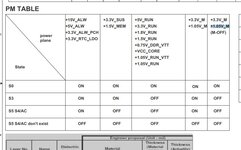
I've checked all the important voltages on the voltage rail table and all the voltages are ok. It's only +0.75V_DDR_VTT that I searched on the schematics but there was no such voltage on the schematic.

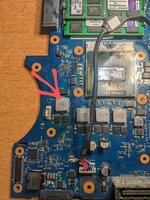
I also measured all the inductors on the board while putting it On. But only one inductor PL15 didn't produce any voltage before shutting down. I don't know whether that is a problem!?. The inductor is +VCCC_GFXCORE.

I've changed Ram, still the same. I disabled the graphics and it still does the same.

Concerning cold solders, I don't know which chips to check.
 

Attachments

  • PXL_20231229_080007973~2.jpg
    PXL_20231229_080007973~2.jpg
    2.9 MB · Views: 5
  • IMG-20231228-WA0016.jpg
    IMG-20231228-WA0016.jpg
    70.6 KB · Views: 5
Who is viewing this thread?

There are currently 0 members watching this topic

Top