Unlock Bios Password L380 Yoga BIOS password

Vahab Hemmati

Support Team
Staff member
Admin
Registered

Reputation:

[ HOW TO USE THE PATCH ]
STEP 1: Flash and replace current BIOS with the generated patch file
STEP 2: Boot the machine
STEP 3: Press ENTER/F1/etc. to enter BIOS settings
STEP 4: Enter any character when asked for Supervisor Password
STEP 5: Press enter when it shows Hardware ID
STEP 6: Press space bar 2x when asked
STEP 7: Turn off machine
STEP 8: Restore original BIOS
STEP 9: Reset BIOS settings to factory default


b4nd1t000

Registered
Bronze

reputation_scoree

[2026/2/21 3:31:25] version 31.19
OS = Windows 10 64bit
Driver Loading....Done
System BIOS Version -> R0RET57P
Applying BIOS Version -> R0RET53W
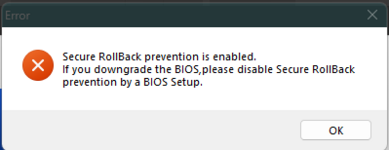
Note : Applying BIOS is older than System BIOS.
AC adapter/Battery check....OK.

BIOS Flashing....
The number of retries of BIOS update = 1
The number of retries of BIOS update = 2
The number of retries of BIOS update = 3
Failed.
Error : An unexpected error has occurred.

Error code = -1073741819

 
Who is viewing this thread?

There are currently 0 members watching this topic

Users who has read this topic
Top